# Integrate with Risk SDK
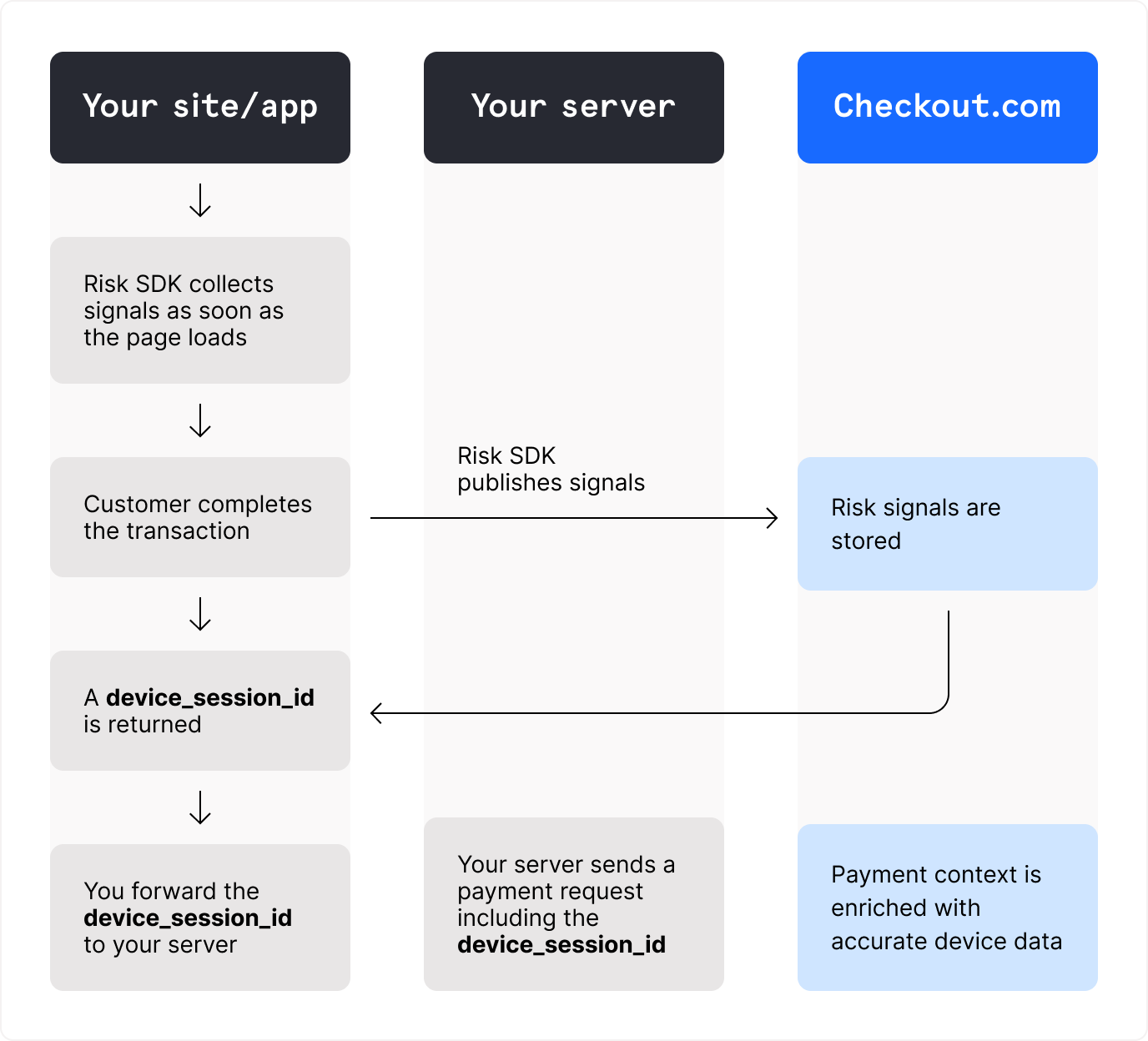
To maximize the efficiency of the [Fraud Detection](https://www.checkout.com/docs/business-operations/prevent-fraud.md) solution, integrate with a Checkout.com Risk SDK for every customer-initiated payment flow.
> **Information**
>
> To enable access to the Risk SDKs, contact your account manager or [request support](https://dashboard.checkout.com/support/new?topic=case_account_management_and_access&issue=issue_account_changes).
---
## How it works
Checkout.com offers three Risk SDKs:
- [Risk.js](https://www.checkout.com/docs/developer-resources/sdks/risk-sdks/risk-js-sdk.md)
- [Risk Android SDK](https://www.checkout.com/docs/developer-resources/sdks/risk-sdks/risk-android-sdk.md)
- [Risk iOS SDK](https://www.checkout.com/docs/developer-resources/sdks/risk-sdks/risk-ios-sdk.md)
The SDKs capture advanced fraud signals that are leveraged in our machine learning (ML) model, including:
- Device identification
- Precise geolocation
- Spoofing attempts
- Fingerprinting data
Every payment enriched with the customer's device data is scored against our ML model for devices.
You can implement this model in your risk strategy through:
- An ML risk profile
- The `:score:` threshold rule property
> **Information**
>
> The device-enriched model performs two times better than the model without device data.
> **Note**
>
> The SDKs do not support the following frameworks:
>
> - Cordova
> - Flutter
> - .NET MAUI / Xamarin
> - React Native
---
## Properties for custom rules
You can use the following device-signal properties captured by the SDKs in your custom rules.
| Property | Sample values | Description |
| --- | --- | --- |
| `:device_fingerprint:` | `rekyngyfnrte3ckzvgjlhw4jfm` | The Checkout.com device fingerprint, which is unique to each device.
For web flows, this value is unique to each browser. |
| `:device_ip:` | `10.256.35.48` | The device's IP address.
If `:payment_ip:` is omitted in the payment request, the rule property falls back to `:device_ip:`. |
| `:device_ip_country:` | `GB` | The ISO-2 [country code](https://www.checkout.com/docs/developer-resources/testing/codes/country-codes.md) associated with the device's IP address. |
| `:device_ip_city:` | `London` | The city associated with the geolocation IP address. |
| `:device_model:` | - `Generic Smartphone`
- `iPad`
- `iPhone`
- `Laptop`
- `Other`
- `Pixel 5`
- `Samsung` | The device model. |
| `:device_os:` | - `Android`
- `Chrome OS`
- `iOS`
- `Linux`
- `Mac OS X`
- `Windows` | The device’s operating system (OS). |
| `:device_os_version:` | `13.3` | The version of the device’s operating system. |
| `:device_browser:` | - `Chrome`
- `Chrome Mobile iOS`
- `Firefox`
- `Opera`
- `Safari` | For web flows, the browser used on the device. |
| `:device_timezone:` | - `America/Chicago`
- `Asia/Singapore`
- `Europe/London` | The timezone of device's IP address. |
| `:device_browser_is_incognito:` | - `false`
- `true` | For web flows, indicates whether the device browser is in incognito mode. |
### View device signals
You can view the customer's device signals in the Dashboard:
1. Sign in to the [Dashboard](https://dashboard.checkout.com).
2. Go to _Payments_ > _Processing_ > _All payments_.
3. Select the relevant payment to open the _Payment details_ page.
To view signals offline, download the transaction report.
---
## Compatibility with Flow
The Risk SDKs are natively integrated and fully compatible with [Flow](https://www.checkout.com/docs/payments/accept-payments/accept-a-payment-on-your-website.md):
Checkout.com can collect device data and correlate it for single-use, token-based payments generated by Flow.
For example, payments where `source.type` is set to `token`.
If your customers can make payments using stored payment details, you must integrate a Risk SDK on your checkout page.
The SDK correlates the customer's device session, because the Flow form is not involved in the checkout journey.
This applies to payments requested using one of the following:
- A payment instrument with `source.type` set to `id`
- A `customer` object with `source.type` set to `customer`
> **Information**
>
> If you do not store reusable card identifiers, you do not need to integrate a Risk SDK with Flow.