# Enable Remember Me
> **Information**
>
> Remember Me is available globally, with some [exclusions](https://support.checkout.com/hc/en-us/articles/29928525046162). To enable Remember Me, contact your account manager or [request support](https://dashboard.checkout.com/support/new?topic=case_account_management_and_access&issue=issue_account_changes).
The Remember Me feature enables customers to save their card details during checkout. The next time the customer shops at any merchant that has Remember Me enabled, we display their saved card details.
This means you can provide a faster checkout experience even if the customer did not save their details directly with you.
Remember Me is available for the following integrations:
- [Flow](https://www.checkout.com/docs/payments/accept-payments/accept-a-payment-on-your-website.md)
- [Hosted Payments Page](https://www.checkout.com/docs/payments/accept-payments/accept-a-payment-on-a-hosted-page.md)
- [Payment Links](https://www.checkout.com/docs/payments/accept-payments/create-a-payment-link.md)
Additionally, you can integrate the:
- [Address component](#Integrate_the_address_component_(optional)) to collect the customer's shipping address.
- [Authentication component](#Integrate_the_authentication_component_(optional)) to collect the customer's email address and authenticate returning Remember Me customers.
Remember Me supports both customer-initiated transactions (CITs) and merchant-initiated transactions (MITs).
If you use Remember Me to store your customer payment details in the following scenarios, you automatically receive the [payment instrument ID](https://api-reference.checkout.com/tag/Payments/#operation/requestAPaymentOrPayout!c=201&path=source/0/id&t=response) in the payment response:
- CITs performed with your existing saved card-on-file system.
For more information, see the `store_payment_details` [field reference](https://api-reference.checkout.com/tag/Flow/#operation/CreatePaymentSession!path=payment_method_configuration/card/store_payment_details&t=request).
- MITs that you process with Flow. For example, if the `payment_type` is `recurring`, `installment`, or `unscheduled`.
For more information, see the `payment_type` [field reference](https://api-reference.checkout.com/tag/Flow/#operation/CreatePaymentSession!path=payment_type&t=request).
> **Information**
>
> You can enable Remember Me alongside the [stored card functionality](https://www.checkout.com/docs/payments/accept-payments/accept-a-payment-on-your-website/extend-your-flow-integration/accept-payments-with-stored-card-credentials.md) to also make the cardholder's stored cards available for faster checkout with Remember Me. To enable the stored card component, contact your account manager or [request support](https://dashboard.checkout.com/support/new?topic=case_account_management_and_access&issue=issue_account_changes).
---
## Customer experience
When a customer chooses to save their card details during checkout we save and link their following details:
- Email address
- Payment details
- Phone number
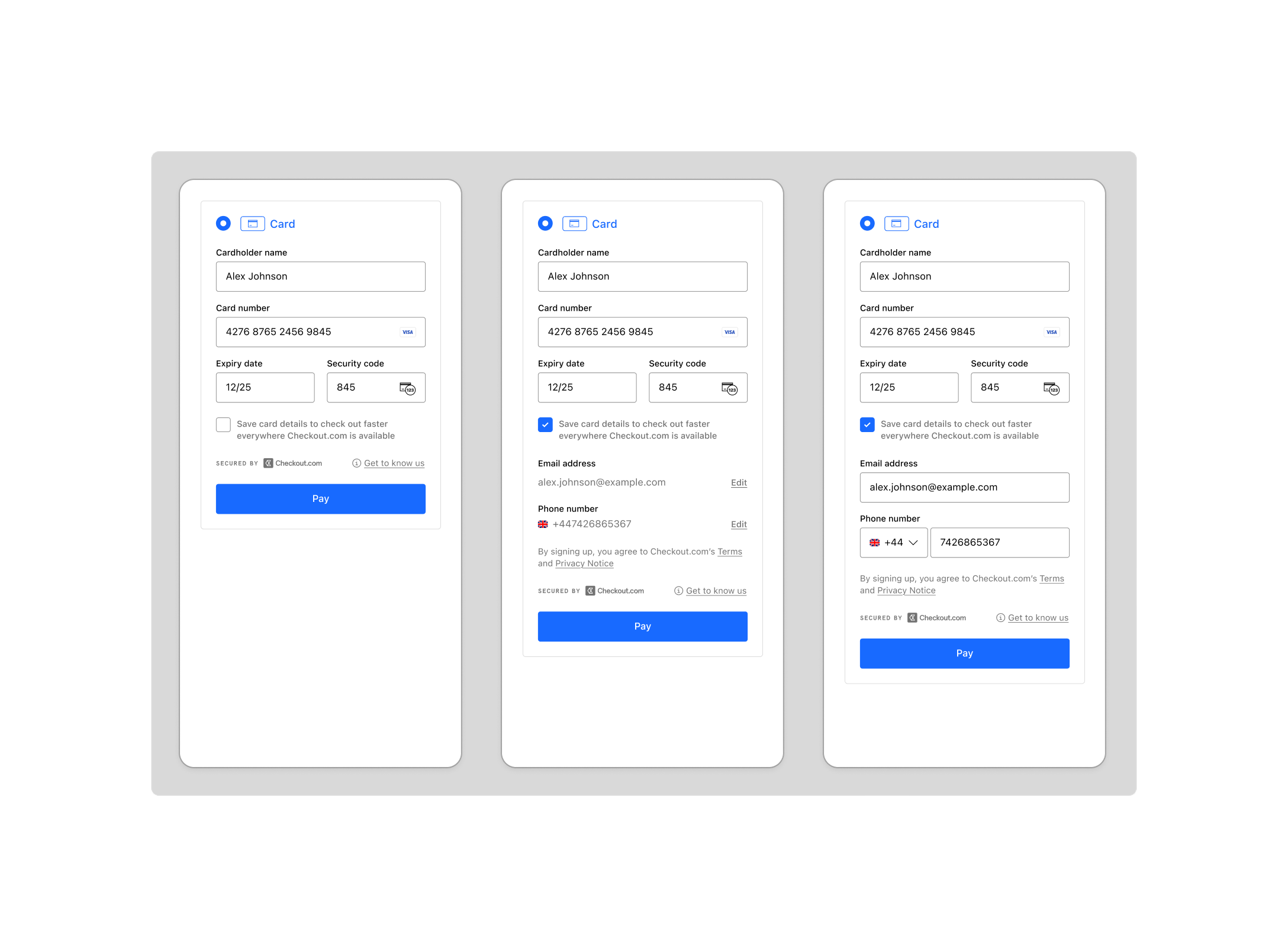
The next time the customer shops with a merchant that enabled Remember Me:
1. Checkout.com uses the email address the customer provided to detect if they have previously saved their details.
2. We send them a one-time code to securely verify their identity and authenticate their session. The code is delivered via email, SMS, or WhatsApp where available.
3. If successful, we display their saved card details to provide a faster checkout experience.
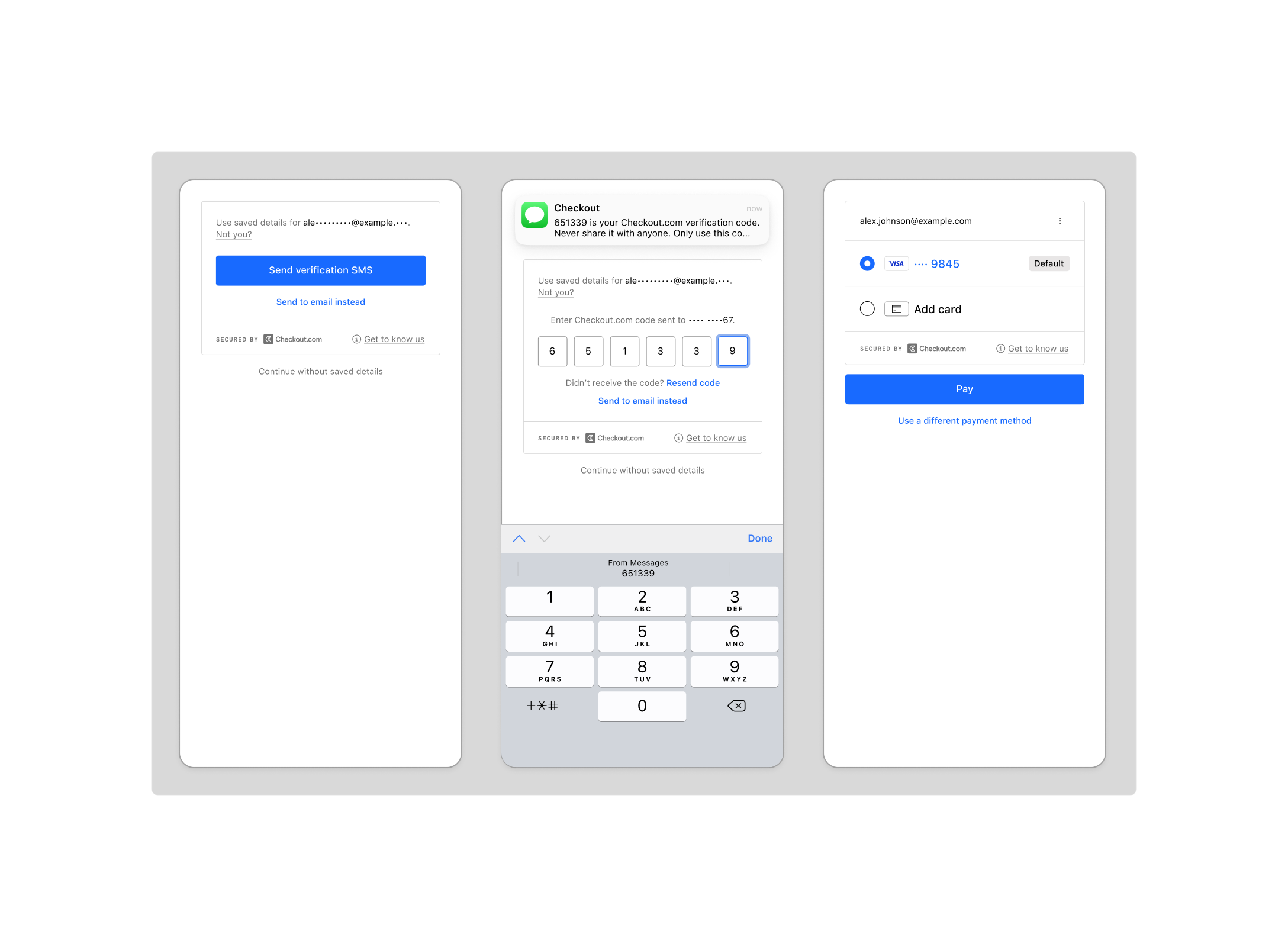
Customers can manage their saved details and view their purchase history on their personal dashboard.
### Notifications
Checkout.com sends the customer the following email notifications:
- Upon sign-up, the customer receives an email confirming they have securely saved their details with Checkout.com.
- To ensure customers have full security over their payments, they receive a confirmation email for each purchase made using payment details they've saved with Checkout.com. This allows them to flag any transactions they do not recognize.
> **Information**
>
> Remember Me's authentication does not replace any additional payment authentication required by the issuer, scheme, or merchant. For example, 3D Secure authentication.
---
## Add Remember Me to your integration
> **Information**
>
> To test your Remember Me integration in the sandbox environment, request your one-time password (OTP) to be sent via email when prompted.
**Flow**
For new customers, you must provide the `customer.email` to display the option to sign up for Remember Me on the checkout page. You can:
- Provide the `customer.email` field when you [Request a Payment Session](https://api-reference.checkout.com/tag/Flow/#operation/CreatePaymentSession). Recommended if you already collect the customer email in your checkout flow.
- Collect the customer email using Flow. Recommended if you do not collect the customer email in your checkout flow.
- [Integrate the Flow authentication component](#Integrate_the_authentication_component_(optional)) to handle email collection and Remember Me authentication. Recommended if you also want to make use of the [Flow address component](#Integrate_the_address_component_(optional)).
To provide a better experience for returning customers, we recommend that you also request the customer's phone number during sign up. You can use the `customer.email` or `customer.phone` they provide when they return to display the option to retrieve their saved payment details.
> **Information**
>
> Providing a placeholder email for returning customers in the request can lead to issues with customer retrieval. If your process relies on placeholder emails, contact your account manager or [request support](https://dashboard.checkout.com/support/new?topic=case_account_management_and_access&issue=issue_account_changes).
> **Information**
>
> Your base URL's `{prefix}` value is unique to your account and environment. To learn how to retrieve your base URLs for the sandbox and production environments, see [API endpoints](https://www.checkout.com/docs/developer-resources/api/api-endpoints.md).
**Production**
`POST` `https://{prefix}.api.checkout.com/payment-sessions`
**Sandbox**
`POST` `https://{prefix}.api.sandbox.checkout.com/payment-sessions`
### Request example
```json
{
"amount": 1000,
"currency": "GBP",
"reference": "ORD-123A",
"billing": {
"address": {
"country": "GB"
}
},
"customer": {
"name": "Jia Tsang",
"email": "jia.tsang@example.com",
"phone": {
"country_code": "+44",
"number": "7700900000"
}
},
"success_url": "https://example.com/payments/success",
"failure_url": "https://example.com/payments/failure"
}
```
### Response example
```json
{
"id": "ps_2Un6I6lRpIAiIEwQIyxWVnV9CqQ",
"payment_session_secret": "pss_9823241e-2cec-4c98-b23d-7b29ow4e2e34",
"payment_session_token": "YmFzZTY0:eyJpZCI6InBzXzJVbjZJNmxScElBaUlFd1FJeXhXVm5WOUNxUSIsImFtb3VudCI6MTAwMCwibG9jYWxlIjoiZW4tR0IiLCJjdXJyZW5jeSI6IkdCUCIsInBheW1lbnRfbWV0aG9kcyI6W3sidHlwZSI6ImNhcmQiLCJjYXJkX3NjaGVtZXMiOlsiVmlzYSIsIk1hc3RlcmNhcmQiLCJBbWV4Il19XSwicmlzayI6eyJlbmFibGVkIjp0cnVlfSwiX2xpbmtzIjp7InNlbGYiOnsiaHJlZiI6Imh0dHBzOi8vYXBpLnNhbmRib3guY2hlY2tvdXQuY29tL3BheW1lbnQtc2Vzc2lvbnMvcHNfMlVuNkk2bFJwSUFpSUV3UUl5eFdWblY5Q3FRIn19fQ==",
"_links": {
"self": {
"href": "https://{prefix}.api.sandbox.checkout.com/payment-sessions/ps_2Un6I6lRpIAiIEwQIyxWVnV9CqQ"
}
}
}
```
**Hosted Payments Page**
Remember Me requires a customer email to display the new and returning user options on the checkout page. You can:
- Provide the `customer.email` field when you [Create a Hosted Payments Page session](https://api-reference.checkout.com/tag/Hosted-Payments-Page/#operation/createAHostedPaymentsSession). Recommended if you already collect the customer email in your checkout flow.
- Collect the customer email using Hosted Payments Page. Recommended if you do not collect the customer email in your checkout flow.
To provide a better experience for returning customers, we recommend that you also request the customer's phone number and provide it in the `customer.phone` field.
To receive the payment instrument in the response, you must set the `payment_method_configuration.card.store_payment_details` field to `enabled` in the request.
> **Information**
>
> The `payment_method_configuration.card.store_payment_details` field is not available in the Hosted Payments Page API by default. To enable the field, contact your account manager or [request support](https://dashboard.checkout.com/support/new?topic=case_account_management_and_access&issue=issue_account_changes).
> **Information**
>
> Your base URL's `{prefix}` value is unique to your account and environment. To learn how to retrieve your base URLs for the sandbox and production environments, see [API endpoints](https://www.checkout.com/docs/developer-resources/api/api-endpoints.md).
**Production**
`POST` `https://{prefix}.api.checkout.com/hosted-payments`
**Sandbox**
`POST` `https://{prefix}.api.sandbox.checkout.com/hosted-payments`
### Request example
```json
{
"amount": 1000,
"currency": "GBP",
"reference": "ORD-123A",
"billing": {
"address": {
"country": "GB"
}
},
"customer": {
"name": "Jia Tsang",
"email": "jia.tsang@example.com",
"phone": {
"country_code": "+44",
"number": "7700900000"
}
},
"success_url": "https://example.com/payments/success",
"failure_url": "https://example.com/payments/failure",
"cancel_url": "https://example.com/payments/cancel"
}
```
### Response example
```json
{
"id": "hpp_xGQBg0AXl3cM",
"reference": "ORD-123A",
"_links": {
"self": {
"href": "https://{prefix}.api.checkout.com/hosted-payments/hpp_xGQBg0AXl3cM"
},
"redirect": {
"href": "https://pay.checkout.com/page/hpp_xGQBg0AXl3cM"
}
}
}
```
**Payment Links**
Remember Me requires a customer email to display the new and returning user options on the checkout page. You can:
- Provide the `customer.email` field when you [Create a Payment Link](https://api-reference.checkout.com/tag/Payment-Links/#operation/createAPaymentLinkSession). Recommended if you already collect the customer email in your checkout flow.
- Collect the customer email using Payment Links. Recommended if you do not collect the customer email in your checkout flow.
To provide a better experience for returning customers, we recommend that you also request the customer's phone number and provide it in the `customer.phone` field.
> **Information**
>
> If you generate a payment link using the Dashboard, the customer must manually provide their phone number when they enable the Remember Me option for the first time. The field will not auto-populate.
> **Information**
>
> Your base URL's `{prefix}` value is unique to your account and environment. To learn how to retrieve your base URLs for the sandbox and production environments, see [API endpoints](https://www.checkout.com/docs/developer-resources/api/api-endpoints.md).
**Production**
`POST` `https://{prefix}.api.checkout.com/payment-links`
**Sandbox**
`POST` `https://{prefix}.api.sandbox.checkout.com/payment-links`
### Request example
```json
{
"amount": 1000,
"currency": "GBP",
"reference": "ORD-123A",
"billing": {
"address": {
"country": "GB"
}
},
"customer": {
"name": "Jia Tsang",
"email": "jia.tsang@example.com",
"phone": {
"country_code": "+44",
"number": "7700900000"
}
},
"return_url": "https://example.com/payments/return"
}
```
### Response example
```json
{
"id": "pl_ELqQJXdXzabU",
"reference": "ORD-123A",
"expires_on": "2024-08-20T20:25:28+08:00",
"_links": {
"redirect": {
"href": "https://pay.sandbox.checkout.com/link/pl_ELqQJXdXzabU"
}
}
}
```
> **Information**
>
> To enable Remember Me in your production environment, contact your account manager or [request support](https://dashboard.checkout.com/support/new).
---
## Integrate the authentication component (optional)
Use the Flow authentication component to collect the customer's email address and authenticate returning Remember Me customers.
If the customer has a Remember Me account, they are prompted to securely authenticate via an OTP. When they authenticate successfully, their saved payment details are automatically populated in the Flow card component.
If they do not have an account and choose a payment method supported by Remember Me, they are prompted to sign up.
This helps to:
- Provide a streamlined user experience for new and returning Remember Me customers.
- Simplify your integration logic – When the payment is complete, the customer email is returned in the response.
> **Information**
>
> The email the customer provides in the authentication component is returned in the payment response. This email address overrides the email used to initiate the payment session.
Use your integration's existing `CheckoutWebComponents` instance to create an `authentication` object and use the `onChange` event handler to retrieve the customer's email address:
```javascript
const authenticationComponent = checkout.create('authentication', {
onChange: (_self, data) => {
// Access the email value via data.email
},
});
```
Mount the authentication component to the website using the `mount()` method. The method takes an [Element selector](https://developer.mozilla.org/en-US/docs/Web/API/Element) or an [Element](https://developer.mozilla.org/en-US/docs/Web/API/Document_object_model/Locating_DOM_elements_using_selectors) as an argument. For example, `#authentication-container` or `document.getElementById(#authentication-container)`, respectively.
**Mount the component to a Selector**
```javascript
authenticationComponent.mount('#authentication-container');
```
**Mount the component to an Element**
```javascript
const authenticationElement = document.getElementById('authentication-container');
authenticationComponent.mount(authenticationElement);
```
> **Note**
>
> Embedding the authentication component within an iframe or onto a Shadow DOM is not supported.
---
## Integrate the address component (optional)
> **Information**
>
> You must [integrate the authentication](#Integrate_the_authentication_component_(optional)) component to use the address component with Remember Me.
Use the Flow address component to collect the customer's shipping address.
If the customer has a Remember Me account, their saved shipping address is automatically populated when they sign in.
Use your integration's existing `CheckoutWebComponents` instance to create a `shipping_address` object and use the `onChange` event handler to retrieve the customer's shipping address:
```javascript
const addressComponent = checkout.create('shipping_address', {
onChange: (_self, data) => {
// Access the shipping address value via data.shippingAddress
},
});
```
Mount the address component to the website using the `mount()` method. The method takes an [Element selector](https://developer.mozilla.org/en-US/docs/Web/API/Element) or an [Element](https://developer.mozilla.org/en-US/docs/Web/API/Document_object_model/Locating_DOM_elements_using_selectors) as an argument. For example, `#authentication-container` or `document.getElementById(#authentication-container)`, respectively.
**Mount the component to a Selector**
```javascript
addressComponent.mount('#address-container');
```
**Mount the component to an Element**
```javascript
const addressElement = document.getElementById('address-container');
addressComponent.mount(addressElement);
```
> **Note**
>
> Embedding the address component within an iframe or onto a Shadow DOM is not supported.